Wednesday, December 5, 2018

How to Enable BI Publisher Tab in Excel 2013


Hello Friends,


Today I am going to show how to enable BI Publisher tab in Excel 2013.


Pre-Requisite-> BI Publisher should be installed in your system.


1) Once BI Publisher is installed, first check if BI publisher tab is enabled or not in excel.


2)  go to File-> Excel Option -> Add Ins -> Select COM Add ins from manage drop down as shown in screen shot:


3) When you click on above Go button, then below screen will appear . select check box as shown in below screen shot.
4) Once you click on OK Button. You will see BI Publisher tab is enabled as shown below:


If you have any questions, put them in comment box. I will respond.


Tuesday, November 27, 2018

How To Create Multi Tab Excel Report in BI Publisher

Hello Friends,

Today I am going to show you how to create multi sheet Excel Report in BI Publisher.

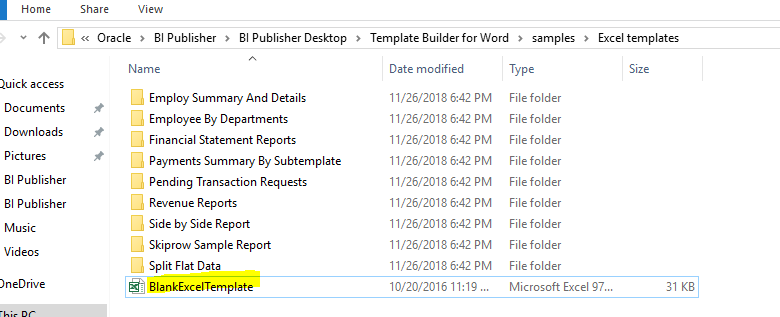
1)  First go to the below path:

C:\Program Files\Oracle\BI Publisher\BI Publisher Desktop\Template Builder for Word\samples\Excel templates. Here you will get an excel file named as "
BlankExcelTemplate"  in which we have to create template.

2) Create a Data template file as below:


3) Now we will create all fields and tags in excel file as below:
 
4) It will show you tag as XDO_?EMP_NAME? for field name and for group it is XDO_GROUP_?EMPS?
These tags can be found under Formula-> Name Manager


5) Now go to the next sheet XDO_METADATA where we will write the logic to split the data for every department.

6) There should be mapping of column A and Column B.

XDO_SHEET_?          <?.//DEPT?>
XDO_SHEET_NAME_?         <?concat(.//DEPARTMENT_NAME,'-',count(.//EMP_NAME))?>

Save the file as .xls only. If you save it as .xlsx it won't work.


Thursday, November 22, 2018

How to remove preview data file, Bursting Control file or data template file from Data definitions

Hello Friends,

Today I am going to show you How to remove preview data file, Bursting Control file or data template file from Data definitions:

1) Remove Preview Data file:
delete
 FROM XDO_LOBS
 WHERE LOB_CODE='TEST'
 AND LOB_TYPE='XML_SAMPLE';

2) Bursting Control file:
delete
 FROM XDO_LOBS
 WHERE LOB_CODE='TEST'
AND LOB_TYPE='BURSTING_FILE';

3) Data Template:
delete
 FROM XDO_LOBS
 WHERE LOB_CODE='TEST'
AND LOB_TYPE='DATA_TEMPLATE';

4) If you want to delete template file from Templates in oracle apps, Template can be xls, rtf etc. use below query:

DELETE
 FROM XDO_LOBS
 WHERE LOB_CODE='TEST'
AND LOB_TYPE='TEMPLATE';

If you like this article hit like and comment. If you get any difficulty, please put in comments, I will try to help you.

Sunday, November 11, 2018

Query to extract New hire and terminated employees for a particualr duration

To get the list of the employees who has joined in a particular period

SELECT   DISTINCT
          papf.employee_number,
          papf.full_name,
          TO_CHAR (ppos.date_start, 'DD-MON-YYYY') date_start
   FROM   per_all_people_f papf,
          per_all_assignments_f paaf,
          per_periods_of_service ppos
  WHERE   ppos.date_start BETWEEN TO_DATE ('01-AUG-2018', 'DD-MON-YYYY')
                              AND  TO_DATE ('31-AUG-2018', 'DD-MON-YYYY')
          AND papf.person_id = paaf.person_id
          AND papf.person_id = ppos.person_id;
         
 To get the list of the employees who has terminated in a particular period

SELECT   PAAF.ASSIGNMENT_ID,
          PAPF.PERSON_ID AS PERSON_ID2,
          PAPF.FIRST_NAME AS FIRST_NAME,
          PAPF.LAST_NAME AS LAST_NAME,
          PAPF.EMAIL_ADDRESS AS EMAIL_ADDRESS,
          TO_CHAR (PPS.ACTUAL_TERMINATION_DATE) AS ACTUAL_TERMINATION_DATE,
          TO_CHAR (PAPF.EFFECTIVE_START_DATE) AS EFFECTIVE_START_DATE,
          PAPF.EMPLOYEE_NUMBER AS EMPLOYEE_NUMBER,
          TO_CHAR (PAPF.EFFECTIVE_END_DATE) AS EFFECTIVE_END_DATE,
          PAPF.BUSINESS_GROUP_ID AS BUSINESS_GROUP_ID,
          PAAF.SUPERVISOR_ID AS SUPERVISOR_ID,
          PAPF.LAST_UPDATE_DATE papf_update_date,
          PAAF.LAST_UPDATE_DATE paaf_update_date,
          ppt.user_person_type
   FROM   PER_ALL_PEOPLE_F PAPF,
          PER_ALL_ASSIGNMENTS_F PAAF,
          PER_PERIODS_OF_SERVICE PPS,
          hr.per_person_type_usages_f pptu,
          hr.per_person_types ppt
  WHERE   PAAF.PERSON_ID = PAPF.PERSON_ID
          AND PAAF.PRIMARY_FLAG = 'Y'
          AND paaf.assignment_type != 'B'
          AND pptu.effective_start_date BETWEEN papf.effective_start_date
                                            AND  papf.effective_end_date
          AND papf.person_id = pptu.person_id
          AND papf.person_type_id = pptu.person_type_id
          AND pptu.person_type_id = ppt.person_type_id
          AND papf.person_type_id = ppt.person_type_id
          AND papf.business_group_id = ppt.business_group_id
          AND PAAF.period_of_service_id = PPS.period_of_service_id
          AND papf.person_id = pps.person_id
          AND ( (ppt.user_person_type LIKE 'Ex-employee%'
                 AND PPS.ACTUAL_TERMINATION_DATE BETWEEN paaf.effective_start_date
                                                     AND  PAAF.EFFECTIVE_END_DATE)
               OR (ppt.user_person_type LIKE 'Employee%'
                   AND TRUNC (SYSDATE) BETWEEN paaf.effective_start_date
                                           AND  PAAF.EFFECTIVE_END_DATE))
          AND ( (ppt.user_person_type LIKE 'Ex-employee%'
                 AND PPS.ACTUAL_TERMINATION_DATE BETWEEN papf.effective_start_date
                                                     AND  PAPF.EFFECTIVE_END_DATE)
               OR (ppt.user_person_type LIKE 'Employee%'
                   AND TRUNC (SYSDATE) BETWEEN papf.effective_start_date
                                           AND  PAPF.EFFECTIVE_END_DATE))
         

Thursday, October 25, 2018

java.sql.SQLException: Invalid column type in OAF

This blog is about how to resolve the above error.

This error is related to VO. If we are defining any dynamic parameters in VO like below then we might come across this error:

Eg.:
SELECT to_char(order_number) AS order_number, flow_status_code  AS order_status
FROM oe_order_headers_all WHERE ORIG_SYS_DOCUMENT_REF like :1 ||':'||'%'


Select Binding style as "Oracle Positional" and your problem will get resolved. Write your comments if you are still facing difficulty.

Tuesday, October 9, 2018

How to call another page on click on a button in OAF and pass the parameters from one page to another

Hello Friends,

Today I am going to tell you how to call another page on click on a button in OAF and pass the parameters from one page to another.

Step1 : Create a page with an item "Message Choice" as item style and give ID as "OrgCode". and create a submit button and  give ID as Submit in item property.

(You can choose any item style as per your requirement)

Step3 : Create a controller and write the below code in ProcessFormRequest Method.

  public void processFormRequest(OAPageContext pageContext, OAWebBean webBean)
  {
    super.processFormRequest(pageContext, webBean);
      OAApplicationModule am = pageContext.getApplicationModule(webBean);
               if (pageContext.getParameter("Submit") != null)
                {  
      String strOrgCode = pageContext.getParameter("OrgCode");
           pageContext.forwardImmediately("OA.jsp?OAFunc=RAC_PLANNED_HOURS&OrgCode="+strOrgCode,
           null,
           OAWebBeanConstants.KEEP_MENU_CONTEXT,
           null,
           null,
           true, // retain AM
           OAWebBeanConstants.ADD_BREAD_CRUMB_NO);
           }
  }


How To Create Hyperlinks in OA Framework

Hello Friends,

Today I am going to tell you how to create hyperlinks in OA Framework. If you have any doubt, you can put your comments in comment box. If you like the post, please hit like button.

Step 1: Create an Item of "Message Styled Text" item style.

Step2: Go to item property, in Navigation section set the destination URL property as below:

OA.jsp?OAFunc=RAC_SHOP_CAP_MANAGEMENT&CCDate={@PlanDate}&OrgCode={OrganizationCode}

RAC_SHOP_CAP_MANAGEMENT  is OAF function to which we want to navigate from hyperlink.

If you don't have function then you can redirect to page directly as below:

OA.jsp?page=/xxcustom/oracle/apps/fnd/webui/HelloWorldPG&CCDate={@PlanDate}&OrgCode={OrganizationCode}


PlanDate and OrganizationCode are VO Attributes whose value we want to pass to another page.

CCDate and OrgCode are the parameters which holds value and we can get the values of these parameters in next page.

Step 3: See below screen shot for all the peoperty: