Thursday, September 13, 2018

Message not found. Application: FND, Message Name: FND_VIEWOBJECT_NOT_FOUND.


Message not found. Application: FND, Message Name: FND_VIEWOBJECT_NOT_FOUND. Tokens: VONAME = RACOrganizationVO1


If you get this kind of error after deploying files to the server that means your View Object has not been added in your AM.xml file.

Before:
 
 
After:


After adding RACOrganizationVO1 in the AM.xml, this error got resolved. Let me know if you are facing some issues.

Friday, August 3, 2018

How to put total for Advance table column in OA Framework


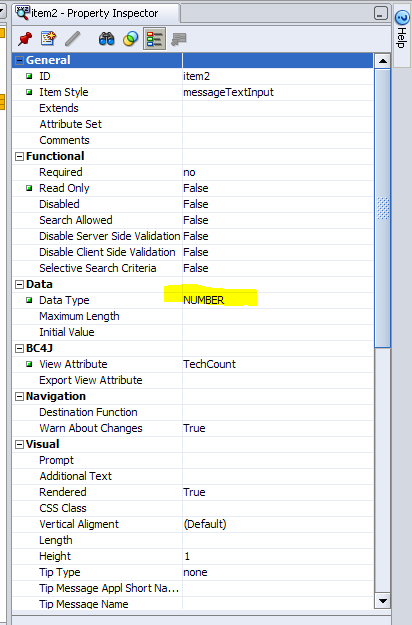
go to advance table -> column-> column properties.

Set the property as below

make sure the item type should be selected as Number only other wise it wont work.

 
By doing these two above steps, you can see the total value calculated automatically. No need to write a code for the same.
 
Let me know if you have any questions. I will answer you.


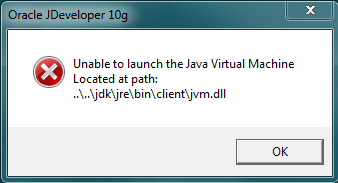
OAF Error : unable to launch the java virtual machine located at path msvcr71.dll


Replication Of Issue: 


Go to path JDEV_Home ->jdev ->bin and try to open any 64 bit Jdeveloper

Reason: 


While Installing Jdeveloper, It install JDK (e.g. jdk160_24) inside Oracle1 -> Middleware and JDeveloper referes to this path as JavaHome. But if the Jdeveloper needs Higher version of JDK than the installed one (e.g JDev 11.1.1.6.0 needs jdk160_27 or above) then this error occurs.


Resolution:


1. Install JDK version compatible for the installed version

2. Go to JDEV_HOME\jdev\bin\jdev.conf and changed the set javahome as
 "SetJavaHome C:\Program Files\Java\<The New JDK Installed>


OAF: The program can't start because MSVCR71.dll is missing from your computer.


In one of my project, in one machine we were not able to open the Jdeveloper  (Version 10.1.3.5 - Patch 19170592 ) which we downloaded from the Metalink Note. This post is to help those who face this issue and don't know what to do to fix this.


After downloading p19170592_R12_GENERIC.zip, unzipped the contents into C:/oracle/Jdev10.1.3.5. After that when we tried to open the Jdeveloper using C:/oracle/Jdev10.1.3.5/jdevbin/jdev/bin/jdevW.exe, we were getting the below error.


"
The program can't start because MSVCR71.dll is missing from your computer. Try reinstalling the program to fix this problem."


Fix:  You just need to copy the msvcr71.dll file from C:/oracle/Jdev10.1.3.5/jdevbin/jdk/bin to C:/oracle/Jdev10.1.3.5/jdevbin/jdev/bin.

After copying the file, Jdeveloper opened successfully.

How To Setup OA Framework in oracle applications 12.2.4


Task 1: Download and Extract the JDeveloper OA Extension zip file

1. Download Patch 19170592: 10G JDEVELOPER WITH OA EXTENSION ARU FOR R12.2.4
2. Extract the archive to c:\jdeveloper_1224
3. Make sure c:\jdeveloper_1224 has the following subdirectories:
jdev
jdevbin
jdevdoc
jdevhome

Task 2: Configure the JDEV_USER_HOME Environment Variable

On a Windows 7 Desktop, right click Computer icon > Properties > Advanced system settings > Environment Variables button > New button
Variable name = JDEV_USER_HOME
Variable value = c:\jdeveloper_1224\jdevhome\jdev


Task 3: Obtain the Database Connection file

Create the c:\jdeveloper_1224\dbc_files\secure directory
Ftp the dbc file located at $FND_SECURE to c:\jdeveloper_1224\dbc_files\secure directory

Task 4: Create a Desktop Short to JDeveloper

Right click on Windows desktop > New > Shortcut > Browse > c:\jdeveloper_1224\jdevbin\jdev\bin\jdevW.exe > Next > Finish
 
 
Task 5: Assign Toolbox Responsibilities to an Applications User
Assign the following responsibilities to a user:
- OA Framework ToolBox Tutorial
- OA Framework ToolBox Tutorial Labs
Task 6: Launch JDeveloper and Configure the Database Connection and the User
From JDeveloper main menu > File > Open and select c:\jdeveloper_1224\jdevhome\jdev\myprojects\toolbox.jws
Expand toolbox from the Applications Navigator tab
 
Select LabSolutions > right click > Project Properties > Oracle Applications > Runtime Connection
Set DBC File Name = c:\jdeveloper_1224\dbc_files\secure\<SID>.dbc
Set Username and Password to the user you assigned the 2 responsibilities
Select Tutorial > right click > Project Properties > Oracle Applications > Runtime Connection
Set DBC File Name = c:\jdeveloper_1224\dbc_files\secure\<SID>.dbc
Set Username and Password to the user you assigned the 2 responsibilities
Click Connections tab and expand Database
Right click Database > New Database Connection to open Connection Wizard > Next


Enter values for the following:
Connection Name
Username = apps
Password = <password>
Host Name
JDBC Port
Service Name
Click Next button > Test Connection > Make sure the Status indicates Success! > Next > Finish
Remove the existing fwk12dev > Right click > Delete


Click Applications Navigator tab
Right click LabSolutions > Project Properties > Business Components
Make sure Connection is set to the Connection Name you defined earlier > OK
Right click Tutorial > Project Properties > Business Components
Make sure Connection is set to the Connection Name you defined earlier > OK


Task 7: Test Your Setup

Right click LabSolutions > Rebuild > Make sure you get Compilation complete: 0 errors
Right click Tutorial > Rebuild > Make sure you get Compilation complete: 0 errors

Right click LabSolutions > Run
This should open this page in the browser: http://mkmoreno-au.au.oracle.com:8988/OA_HTML/test_fwklabsolutions.jsp
Right click Tutorial > Run
This should open this page in the browser: http://mkmoreno-au.au.oracle.com:8988/OA_HTML/test_fwktutorial.jsp

Wednesday, January 3, 2018

If XML report output is coming in XML format when output type is selected as EXCEL in template

1)      System Administration-> Concurrent -> programs


2)      Put “XX_OSB_PT_TRANS” in program field and click on go

3)      Click on update


4)      Go to onsite settings tab

Select the value from template field and click on Apply button.


Wednesday, May 3, 2017

How to display table with multiple rows in a workflow notification along with additional text


Prerequisites:
1) Create Item Type
2) Create Process
3) Create Notification
4) Create message


Step1- Create an Attribute of type document. Give value as constant "plsqlclob:XX_DEMO.getclobdocument/&ITEM_KEY"


2) Copy this attribute and paste it under message created.


3) Click on the message and go to body tab.Give subject and body here.In Body include document type attribute you have created above.


4)  Now we have to write a procedure which will create table with multiple rows data along with additional text.

  procedure getClobDocument(document_id   IN VARCHAR2,
                            display_type  IN VARCHAR2,
                            document      IN OUT CLOB,
                            document_type IN OUT VARCHAR2)

   IS
    CURSOR cur_proj_invoice IS
      select b.segment1 as proj_num,
             a.customer_trx_id,
             a.TRX_NUMBER,
             trx_date,
             a.CUSTOMER_REFERENCE,
             b.INVOICE_COMMENT,
             a.ATTRIBUTE15 as amount
        from ra_customer_trx_all a, pa_projects_all b
       where a.INTERFACE_HEADER_ATTRIBUTE1 = b.segment1
         and rownum <= 2;

    l_document             VARCHAR2(32767);

    cnt                    INTEGER;
    l_docid                pls_integer;
    l_errmsg               varchar2(100) := 'The Document is not found in the Database';
    l_bdoc                 clob;

  BEGIN

    l_docid := to_number(document_id);

    --l_docid := document_id;

    dbms_lob.CreateTemporary(l_bdoc, FALSE, DBMS_LOB.CALL);

    dbms_lob.createtemporary(document, FALSE, dbms_lob.CALL);

    l_document := NULL;

    l_document := '<br></br>' || /*l_po_type*/
                  'Please review the below information for project ' ||
                  l_po_num || ' and provide your Approval.<br><br>';
    l_document := l_document || '<b>Amount: </b>INR ' || l_amt_total ||
                  ' <br></br><b>Tax Amount: </b> INR ' || l_tax_amt ||
                  '<br></br><b>Supplier: </b>' || l_VENDOR_NAME ||
                  '<br></br><b>Supplier Site: </b>' || l_sup_site ||
                  '<br></br>';


    l_document := l_document ||
                  '<table border="0" cellspacing="0" cellpadding="0" ><tr><td style="color:black;font-family:Arial, Helvetica, Geneva, sans-serif;font-size:11pt;font-weight:bold"><u>Project Details </u></font></td></tr><tr><td><table width=100% border=0 cellpadding=0 cellspacing=0 ><tr><td>' ||
                  '<br></br>';
    -- '<table width=80% border="0" cellspacing="0" cellpadding="0" ><tr><td style="color:black;font-family:Arial, Helvetica, Geneva, sans-serif;font-size:11pt;font-weight:bold">Release Shipment Details </font></td></tr><tr><td><table width=100% border=0 cellpadding=0 cellspacing=0 ><tr><td>';
    l_document := l_document ||
                  '<table summary="" width=100% border=0 cellpadding=3 cellspacing=1 bgcolor=white >';
    l_document := l_document ||
                  '<tr><th scope=col align=LEFT valign=baseline bgcolor=#7EC0EE><span style="color:black;font-family:Arial, Helvetica, Geneva, sans-serif;font-size:10pt">Project No</span></th>';
    l_document := l_document ||
                  '<th scope=col align=LEFT valign=baseline bgcolor=#7EC0EE><span style="color:black;font-family:Arial, Helvetica, Geneva, sans-serif;font-size:10pt">Customer Name.</span></th>';
    l_document := l_document ||
                  '<th scope=col align=LEFT valign=baseline bgcolor= #7EC0EE><span style="color:black;font-family:Arial, Helvetica, Geneva, sans-serif;font-size:10pt">Project Lead.</span></th>';
    l_document := l_document ||
                  '<th scope=col align=LEFT valign=baseline bgcolor=#7EC0EE><span style="color:black;font-family:Arial, Helvetica, Geneva, sans-serif;font-size:10pt">Project financial Analyst.</span></th>';
    /*l_document := l_document ||
                  '<th scope=col align=LEFT valign=baseline bgcolor=#7EC0EE><span style="color:black;font-family:Arial, Helvetica, Geneva, sans-serif;font-size:10pt">CFC biller</span></th>';
    l_document := l_document ||
                  '<th scope=col align=LEFT valign=baseline bgcolor=#7EC0EE><span style="color:black;font-family:Arial, Helvetica, Geneva, sans-serif;font-size:10pt">Quantity</span></th>';
    l_document := l_document ||
                  '<th scope=col align=LEFT valign=baseline bgcolor=#7EC0EE><span style="color:black;font-family:Arial, Helvetica, Geneva, sans-serif;font-size:10pt">Unit Price</span></th>';*/
    /*l_document := l_document ||
                  '<th scope=col align=LEFT valign=baseline bgcolor=#7EC0EE><span style="color:black;font-family:Arial, Helvetica, Geneva, sans-serif;font-size:10pt">Location</span></th></tr>';
    l_document := l_document ||
                  '<th scope=col align=LEFT valign=baseline bgcolor=#7EC0EE><span style="color:black;font-family:Arial, Helvetica, Geneva, sans-serif;font-size:10pt">Ship-To Org</span></th>';
    l_document := l_document ||
                  '<th scope=col align=LEFT valign=baseline bgcolor=#7EC0EE><span style="color:black;font-family:Arial, Helvetica, Geneva, sans-serif;font-size:10pt">Need-By Date</span></th></tr>';*/
    l_document := l_document ||
                  '<th scope=col align=LEFT valign=baseline bgcolor=#7EC0EE><span style="color:black;font-family:Arial, Helvetica, Geneva, sans-serif;font-size:10pt">Amount</span></th></tr>';

    FOR cnt IN cur_proj_invoice LOOP
 
      l_document := l_document ||
                    '<tr><td align=LEFT valign=baseline bgcolor=#EEEEE0><span style="color:black;font-family:Arial, Helvetica, Geneva, sans-serif;font-size:10pt">' ||
                    cnt.proj_num || '</span></td>';
      l_document := l_document ||
                    '<td align=LEFT valign=baseline bgcolor=#EEEEE0><span style="color:black;font-family:Arial, Helvetica, Geneva, sans-serif;font-size:10pt">' ||
                    cnt.customer_trx_id || '</span></td>';
      l_document := l_document ||
                    '<td align=LEFT valign=baseline bgcolor=#EEEEE0><span style="color:black;font-family:Arial, Helvetica, Geneva, sans-serif;font-size:10pt">' ||
                    cnt.TRX_NUMBER || '</span></td>';
      l_document := l_document ||
                    '<td align=LEFT valign=baseline bgcolor=#EEEEE0><span style="color:black;font-family:Arial, Helvetica, Geneva, sans-serif;font-size:10pt">' ||
                    cnt.trx_date || '</span></td>';
      /*      l_document := l_document ||
                    '<td align=LEFT valign=baseline bgcolor=#EEEEE0><span style="color:black;font-family:Arial, Helvetica, Geneva, sans-serif;font-size:10pt">' ||
                    cnt.CUSTOMER_REFERENCE || '</span></td>';
      l_document := l_document ||
                    '<td align=LEFT valign=baseline bgcolor=#EEEEE0><span style="color:black;font-family:Arial, Helvetica, Geneva, sans-serif;font-size:10pt">' ||
                    cnt.INVOICE_COMMENT || '</span></td>';
      l_document := l_document ||
                    '<td align=LEFT valign=baseline bgcolor=#EEEEE0><span style="color:black;font-family:Arial, Helvetica, Geneva, sans-serif;font-size:10pt">' ||
                    cnt.INVOICE_COMMENT || '</span></td>';*/
      /*      l_document := l_document ||
                   '<td align=LEFT valign=baseline bgcolor=#EEEEE0><span style="color:black;font-family:Arial, Helvetica, Geneva, sans-serif;font-size:10pt">' ||
                   cnt.location_code || '</span></td></tr>';
      l_document := l_document ||
                   '<td align=LEFT valign=baseline bgcolor=#EEEEE0><span style="color:black;font-family:Arial, Helvetica, Geneva, sans-serif;font-size:10pt">' ||
                   cnt.name || '</span></td></tr>';
       l_document := l_document ||
                   '<td align=LEFT valign=baseline bgcolor=#EEEEE0><span style="color:black;font-family:Arial, Helvetica, Geneva, sans-serif;font-size:10pt">' ||
                   cnt.need_by_date || '</span></td></tr>'; */
      l_document := l_document ||
                    '<td align=LEFT valign=baseline bgcolor=#EEEEE0><span style="color:black;font-family:Arial, Helvetica, Geneva, sans-serif;font-size:10pt">' ||
                    cnt.INVOICE_COMMENT || '</span></td></tr>';
    END LOOP;

    l_document := l_document ||
                  '</table></td></tr></table></td></tr></table><br>';

    dbms_lob.writeappend(l_bdoc, length(l_document), l_document);

    l_nm_clob_length := dbms_lob.getlength(l_bdoc);

    dbms_lob.Copy(document, l_bdoc, l_nm_clob_length, 1, 1);

  EXCEPTION
    when others then
      wf_core.context('XX_DEMO', 'getClobDocument', document_id);
      raise;
  end getClobDocument;


How to make comments field mandatory for an approver in workflow notification


1) open workflow builder tool and connect to data base.


2) search for "standard" workflow


3) drag this to left hand side as below and click ok.


4)Right click on standard and click on new then Item type


5) give name and description And save


6)right click on process and New process. give details and save.


7) right click on attribute and new attribute. give details and save.


8) right click on message and new message. give all details and save.


9) go to result tab of the above window. select this details and save.


10) after creating message.Add comments attribute from attribute and paste it in the message and select attribute as respond type.


11) click on notification and new notification. give details and save.in this window select function as pl sql package and procedure name where we will write logic to make comments field mandatory.


12) Click on process, it will open blank window like below


13) copy start and end function from standard workflow and paste it under custom workflow function section.

drag both function to the process window


14) drag notification also in this window and connect these icons with each other as below and apply:


15) click on start activity and go to node tab. select value as start from drop down as below:


16)  click on End activity and go to node tab. select value as end from drop down as below and Apply:


17) now workflow builder part is finished. Now we will see pl/sql part. first create sequence named as XX_SEQ in the data base which will be used to store item key value. This is the code below


CREATE OR REPLACE PACKAGE BODY XX_DEMO IS
  PROCEDURE LAUNCH_WORKFLOW
   IS
    v_master_form_link varchar2(5000);
    v_item_number      varchar2(100);
    v_add_item_id      varchar2(5000);
    error_code         varchar2(100);
    error_msg          varchar2(5000);
    v_item_key         VARCHAR2(10) := to_char(xx_SEQ.nextval);
    v_item_type        varchar2(10) := 'XX_TEST';
    v_process          varchar2(20) := 'XX_PROC';
  BEGIN

    WF_ENGINE.CREATEPROCESS(v_item_type, v_item_key, v_process);


    WF_ENGINE.STARTPROCESS(v_item_type, v_item_key);
    commit;

  EXCEPTION
    WHEN OTHERS THEN
      error_code := SQLCODE;
      error_msg  := SQLERRM(SQLCODE);
      -- add dbms or fnd_output messages as required
  END LAUNCH_WORKFLOW;

  procedure check_comment_reject(ITEMTYPE  IN VARCHAR2,
                                 ITEMKEY   IN VARCHAR2,
                                 ACTID     IN NUMBER,
                                 FUNCMODE  IN VARCHAR2,
                                 RESULTOUT IN OUT VARCHAR2) is
    l_notfication_result varchar2(1000);
    l_sup_comments       varchar2(10000);

  begin

    if (FUNCMODE = 'RESPOND') then
      l_notfication_result := wf_notification.getAttrText(wf_engine.context_nid,
                                                          'RESULT');
      l_sup_comments       := wf_notification.GetAttrText(nid   => wf_engine.context_nid,
                                                          aname => 'XX_COMMENT');

      if (l_notfication_result = 'REJECTED') then
     
        if l_sup_comments is null then
          raise_application_error('-20002',
                                  'Comments are mandatory while rejecting request');
        else
          RESULTOUT := 'COMPLETE:REJECT';
        end if;
      elsif (l_notfication_result = 'APPROVED') then
        RESULTOUT := 'COMPLETE:APPROVE';
      end if;
        WF_ENGINE.SetItemAttrText(ITEMTYPE,
                                ITEMKEY,
                                'XX_COMMENT',
                                l_sup_comments);
    end if;
  exception
    when others then
      wf_core.context('XX_DEMO',
                      'check_comment_reject',
                      ITEMTYPE,
                      ITEMKEY,
                      ACTID,
                      FUNCMODE);
      raise;

  end;
END XX_DEMO;


Now if you are facing any difficulty, please put in comments, will respond you on the same.